I wanted a quick side project. Something visual, a little silly, and just complex enough to flex some AWS muscles. The result is MemeCloud — a fully serverless meme generator that lets you pick a template, add text, and download a watermark-free image. I built it almost entirely with AI pair-programming tools, starting with GitHub Copilot and then switching to Claude.
This post is about what actually happened — not the polished version. It covers the architecture, the bugs, the AI experience, and the things that bit me twice.
What It Does
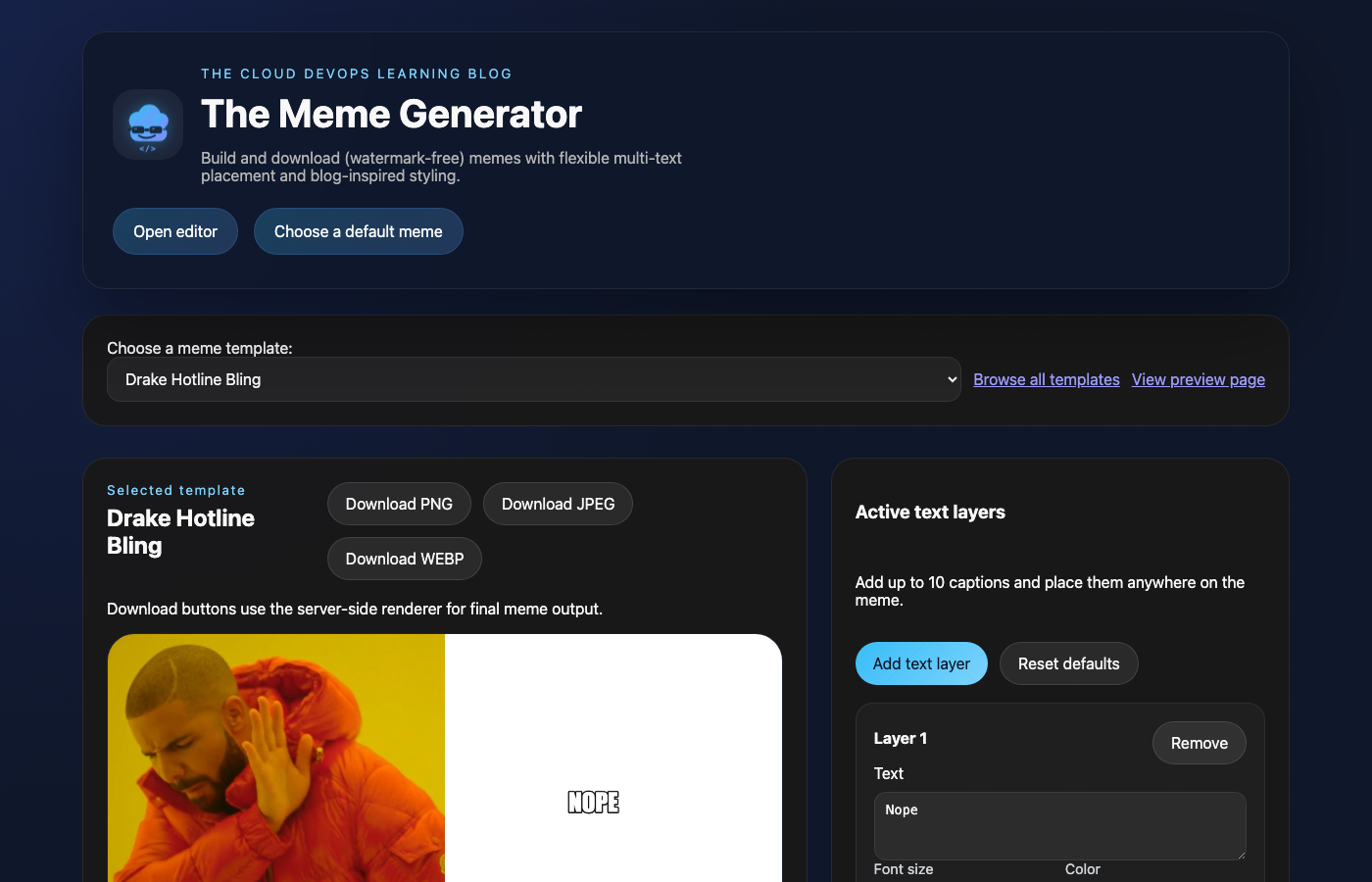
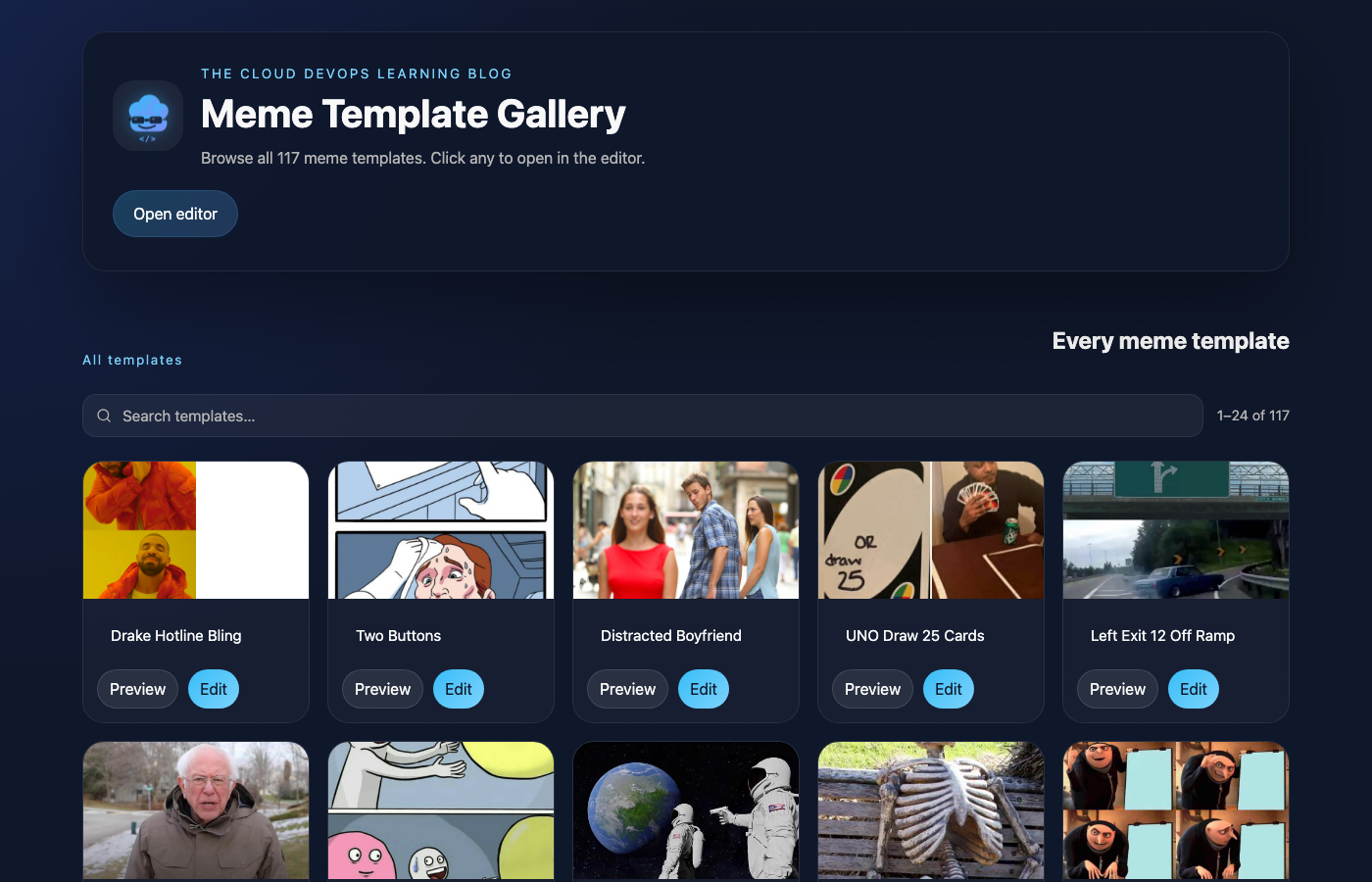
The live site is at memes.theclouddevopslearningblog.com. It has:
- A canvas-based editor with draggable text layers
- 117 meme templates sourced from the imgflip API
- Server-side image generation via AWS Lambda + Pillow
- A searchable, paginated gallery of all templates
- A preview page showing the server-rendered output
- A “Top 10 Most Generated” section driven by DynamoDB counters
The stack is all AWS — no containers, no EC2, no servers to babysit.
The Architecture
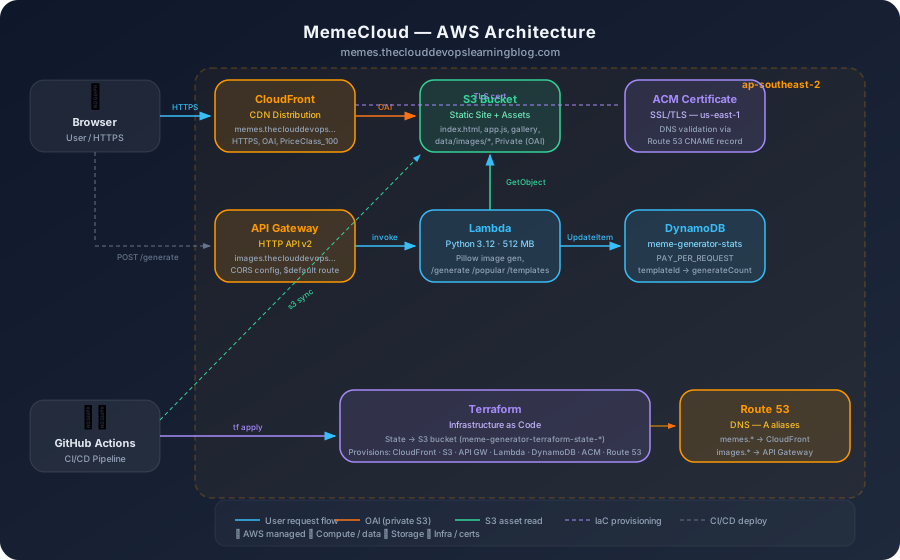
Here’s the full picture:
| Layer | Service | Notes |
|---|---|---|
| Static frontend | S3 + CloudFront | Private bucket, OAI, HTTPS redirect |
| API | API Gateway HTTP v2 | Custom domain, CORS config, $default route |
| Image generation | Lambda (Python 3.12) | Pillow, 512 MB, 30s timeout |
| Template/image storage | S3 (same bucket) | data/images/* prefix, private |
| Usage stats | DynamoDB | PAY_PER_REQUEST, atomic counters |
| DNS | Route 53 | A aliases to CloudFront and API GW |
| TLS | ACM | DNS-validated; CloudFront cert in us-east-1 |
| CI/CD | GitHub Actions | Path-filtered: infra/frontend/backend jobs |
| IaC | Terraform | Remote state in S3 |
The entire site deploys from a git push to main. A path filter in the GitHub Actions workflow decides which of three jobs runs — Terraform (for infra/Lambda changes), static sync (for frontend changes), or both.
Starting with GitHub Copilot
I initially scaffolded the project using GitHub Copilot in VS Code. For boilerplate it was fine — it filled in Terraform resource blocks reasonably well when I gave it strong comments, and autocompleted obvious JavaScript patterns.
But I ran into its limits quickly:
- Context window is short. Copilot sees the current file and a bit of adjacent code. As soon as the project had more than a few files, suggestions started ignoring what was already implemented elsewhere. I got duplicate function definitions and conflicting naming conventions.
- It doesn’t reason about deployment. I’d ask it to help debug why a Lambda wasn’t routing correctly, and it would suggest checking IAM permissions or tweaking the function code — without considering that the problem was in how the API Gateway event payload was structured.
- It can’t run commands or read logs. Every iteration required me to manually copy error output back into a chat window, which interrupted flow constantly.
- Its training data has a shelf life. When Copilot scaffolded the Terraform for the Lambda function, it suggested
runtime = "python3.9"— a runtime that AWS deprecated in late 2023 and has since blocked for new deployments. Copilot had no way of knowing the runtime was end-of-life; it just pattern-matched on what it had seen in training data. The deploy would have failed (or worse, silently used a frozen, unpatched runtime) if I hadn’t caught it and bumped topython3.12.
I switched to Claude (via Claude Code) partway through. The difference was significant enough that I want to be specific about it.
What Claude Did Better
The biggest win was multi-file reasoning. Claude kept the full project context across infra/main.tf, lambda/app.py, the GitHub Actions workflow, and the frontend JS files simultaneously. When a bug touched three files, it could diagnose and fix all three at once.
The second win was working with real outputs. I could paste a CloudWatch log line or a curl response and get a diagnosis, not a guess. When the Lambda was returning 500 errors, the first thing Claude asked for was logs — not “have you checked your IAM permissions?”
It also caught things I wouldn’t have noticed for a while:
- The
actions/checkout@v3→@v6deprecation warnings in the pipeline - An unused
TypeDeserializerimport that crept in when we added DynamoDB - The
drawparameter that became dead code after refactoringwrap_text()
The honest caveat: Claude isn’t magic. It made mistakes too — it confidently suggested code that used the wrong API Gateway payload format, and I had to push back. The difference is it corrects course well once you show it the actual error.
The Pitfalls (The Part Nobody Blogs About)
1. cp -R and the Ghost Folder
The very first deploy appeared to work — the frontend loaded. But the meme images were 403ing everywhere.
The culprit was this line in the deploy workflow:
# WRONG — creates public/data/data/images/...
mkdir -p public/data && cp -R data public/data

# RIGHT
cp -R data public/
cp -R data public/data copies the data directory into the destination when the destination already exists, creating public/data/data/. The S3 sync then uploaded files to data/data/images/..., CloudFront had no idea where to find them, and everything 403’d.
CloudFront returns 403, not 404, for objects that don’t exist in a private bucket with an OAI policy. That made this harder to diagnose — it looked like a permissions issue, not a missing file issue.
Lesson: Always verify the exact S3 key structure after your first deploy. aws s3 ls s3://your-bucket --recursive | head -20 takes 5 seconds and would have caught this immediately.
2. API Gateway Payload Format v1.0 vs v2.0
This one cost me more time than it should have. The Terraform for the API Gateway integration was:
resource "aws_apigatewayv2_integration" "lambda" {
  payload_format_version = "2.0"
  ...
}
But the Lambda code was reading the event like this:
method = event.get('httpMethod', 'GET')   # v1.0 field — always None in v2.0
path   = event.get('path', '')            # v1.0 field — always None in v2.0
With format 2.0, those fields don’t exist. The method defaulted to 'GET' and the path to '', so every single request — including OPTIONS preflights — fell through to the 404 branch. The browser saw a 404 on the OPTIONS preflight and blocked all requests as a CORS failure.
The fix was to check both formats:
http_ctx = event.get('requestContext', {}).get('http', {})
method   = event.get('httpMethod') or http_ctx.get('method', 'GET')
path     = event.get('path') or event.get('rawPath', '')
We also added a cors_configuration block to the API Gateway resource so API Gateway handles OPTIONS automatically, without invoking Lambda at all:
resource "aws_apigatewayv2_api" "api" {
  name          = "meme-generator-api"
  protocol_type = "HTTP"

  cors_configuration {
    allow_origins = ["https://memes.theclouddevopslearningblog.com"]
    allow_methods = ["GET", "POST", "OPTIONS"]
    allow_headers = ["Content-Type", "Authorization"]
    max_age       = 300
  }
}
Lesson: When you set payload_format_version = "2.0", the entire event structure changes. Check the AWS docs for format 2.0 and make sure your Lambda reads from the right fields.
3. Pillow and Lambda’s Amazon Linux Runtime
The Lambda kept returning 500 with cannot import name '_imaging' from 'PIL'. The _imaging module is a C extension — it has to be compiled for the target platform.
The packaging step in the workflow was:
# WRONG — pulls wheels for the runner's architecture
pip install -r lambda/requirements.txt -t /tmp/lambda_build
GitHub Actions runners are Ubuntu x86_64, but they’re not Amazon Linux. The wheels pip downloads by default are for the runner, not for Lambda’s Amazon Linux 2 environment.
The fix:
pip install \
  --platform manylinux2014_x86_64 \
  --target /tmp/lambda_build \
  --implementation cp \
  --python-version 3.12 \
  --only-binary=:all: \
  -r lambda/requirements.txt
This tells pip to fetch the manylinux2014_x86_64 wheel — the one that works on Amazon Linux — even though you’re running on Ubuntu. --only-binary=:all: prevents pip from falling back to source builds, which would compile against the runner’s glibc.
Lesson: Any Lambda that uses native Python extensions (Pillow, numpy, pandas, psycopg2, etc.) needs its dependencies built for Amazon Linux. The manylinux2014_x86_64 flag is the cleanest way to handle this in CI without Docker.
4. Pillow 10 Removed textsize() and getsize()
Once the binary wheel issue was fixed, the Lambda started loading — but image generation returned 500 with 'ImageDraw' object has no attribute 'textsize'.
Pillow 10 (released mid-2023) removed several deprecated methods:
| Old API (≤ Pillow 9) | New API (Pillow 10+) |
|---|---|
draw.textsize(text, font=font) |
font.getbbox(text) → (left, top, right, bottom) |
font.getsize(text) |
font.getbbox(text) |
font.getlength(text) |
still available for width only |
The migration for textsize returning (width, height):
# Before
width, height = draw.textsize(text, font=font)

# After
bbox   = font.getbbox(text)
width  = bbox[2] - bbox[0]
height = bbox[3] - bbox[1]
Lesson: Pin your dependency versions in requirements.txt if you’re not actively maintaining the code. Or migrate to the new API and test locally before deploying. Pillow unpinned will eventually pull Pillow 10+ and break old textsize calls.
5. The ACM Certificate Region Gotcha
For CloudFront, ACM certificates must be in us-east-1, regardless of where your other resources are. I had the API Gateway certificate in ap-southeast-2 (correct for regional API Gateway), but the site certificate also needed a separate us-east-1 provider in Terraform:
provider "aws" {
  alias  = "us_east_1"
  region = "us-east-1"
}

resource "aws_acm_certificate" "site" {
  provider          = aws.us_east_1   # ← required for CloudFront
  domain_name       = var.site_domain
  validation_method = "DNS"
}
The API Gateway cert stays in the main region — it’s a regional endpoint, not a global CDN.
The Stats Feature: DynamoDB Counters

One of the later additions was tracking which memes get generated most, to power a real “Top 10” section rather than a static list.
Every successful /generate call does an atomic DynamoDB increment:
table.update_item(
    Key={'templateId': str(template_id)},
    UpdateExpression='ADD generateCount :inc',
    ExpressionAttributeValues={':inc': 1},
)
ADD on a non-existent attribute creates it, so no separate “initialise counter” step needed. The /popular endpoint scans the table (only 117 possible templates, so a full scan is fine), sorts by generateCount, and returns the top 10 template IDs. The frontend maps those IDs back to full template objects and renders the cards with gradient rank badges (#1, #2, …).
The table uses PAY_PER_REQUEST billing — it’ll be essentially free at blog-scale traffic.
Tips for AI-Assisted DevOps
After this project, here’s what I’d tell someone starting a similar workflow:
1. Give the AI the real error, not your interpretation of it.
Paste the full log line, the full curl response, the full error message. “Lambda is returning 500” is useless. Runtime.ImportModuleError: cannot import name '_imaging' is immediately actionable.
2. Multi-file changes work better as a single prompt.
“Fix the CORS issue” with no context gets a generic answer. “The OPTIONS preflight returns 404 because the Lambda event parsing reads httpMethod (v1.0 field) but we’re on payload format 2.0 — fix both the Lambda and the Terraform CORS config” gets a specific, correct fix.
3. Verify structural changes with the tool the bug lives in.
After fixing the cp -R bug, verify with aws s3 ls, not just by loading the page. Page load can succeed via cache while the underlying structure is still wrong.
4. Verify runtime and service versions against current AWS docs.
AI tools suggest what they’ve seen in training data — which has a cutoff date. AWS deprecates Lambda runtimes, removes EC2 instance types, and changes service defaults over time. Always cross-check the runtime version (e.g. python3.9 → deprecated), the Terraform provider version, and any managed service settings against the current AWS docs before deploying. A deprecated runtime might still accept a terraform apply but will be frozen on an unpatched interpreter.
6. Pin or understand your dependencies.
Every Pillow, boto3, or requests without a version pin is a future incident. At minimum, know what major version you’re on and what breaking changes the next major version includes.
7. Path-filtered CI is worth the setup time.
The GitHub Actions workflow has three separate jobs — terraform, deploy_site, filter — and only runs the relevant one based on which files changed. This cuts workflow time significantly and avoids re-deploying unchanged Lambdas when you only touched a CSS file.
8. CloudFront always 403s for missing objects (not 404).
With a private S3 bucket + OAI, CloudFront converts missing-object responses to 403 Forbidden. Don’t assume a 403 means permissions — check the actual object key in S3 first.
What I’d Do Differently
- Write integration tests for the Lambda from day one. The Pillow API migration bug and the event format bug would both have been caught locally before touching CI.
- Use
Pillow>=10,<11(or whatever current major) instead of unpinned — thetextsizeremoval was well-documented, but only if you’re reading release notes. - Cache CloudFront invalidations. Right now every frontend deploy does
/*, which costs money and is slow. Invalidating only the changed paths would be better. - Add a
/healthendpoint to the Lambda so you can verify it’s running before the frontend tries to use it.
Try It
The site is live at memes.theclouddevopslearningblog.com — generate a meme, and it gets counted in the Top 10 leaderboard. The source code is on GitHub.
The whole thing cost about $0 to run at blog-scale thanks to Lambda’s free tier, DynamoDB’s on-demand billing, and CloudFront’s 1TB/month free data transfer. The only non-free part is the Route 53 hosted zone ($0.50/month) and the ACM certificate (free, but it took a real DNS validation record).
Building it with AI tools was faster than doing it alone — but not because the AI never made mistakes. It was faster because the feedback loop was tighter: paste a log, get a targeted fix, apply it, move on. The mistakes still happened; they just got diagnosed quicker.
Have you built something on AWS with AI pair-programming? I’d love to hear what bit you in the comments.